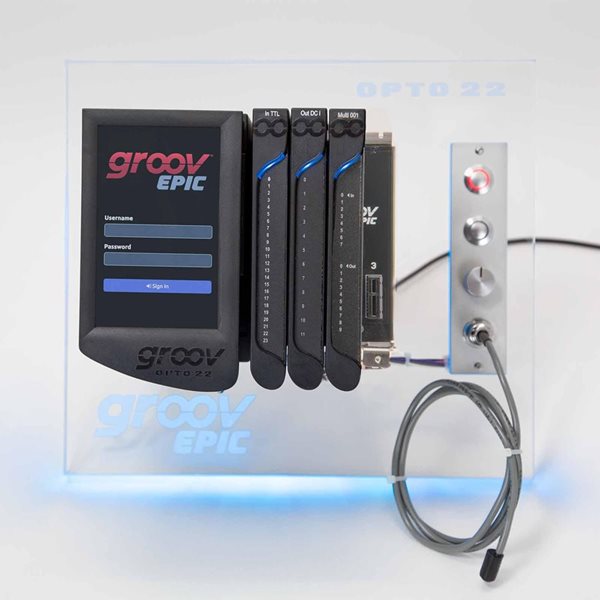
The four-day groov EPIC System Premium Factory Training class is held at Opto 22 company headquarters in Temecula, California.
Course tasks take you through configuring and programming hardware and software. Apply what you learn to your industrial automation application and build solutions for the Industrial Internet of Things (IIoT).
Class size is maximum of 12 students, each student at their own training station, programming their own groov EPIC Learning Center.
Prerequisites: Students must have a working knowledge of Microsoft Windows, but no prior Opto 22 knowledge is required.
Class schedule (lunch is provided each day):
- Monday: Lunch at 12:00 p.m., instruction begins at 12:30 p.m. and ends at 5:00 p.m.
- Tuesday: 8:00 a.m. to 5:00 p.m.
- Wednesday: 8:00 a.m. to 5:00 p.m.
- Thursday: 8:00 a.m. to 12:30 p.m.

See the complete 2024 training class schedule and current availability.

To Purchase: See GROOV-TRAINING-PF; cost is $995 per seat.
Hear what other attendees have said about their Premium Factory Training experience:
"The training was awesome." - Thomas Coombs, Project Engineer, Northeast Automation Co.
"...this was truly an exceptional training - best technical training I've been to in my career."- Jacob Zehnder, Engineer II, Parker Hannifin
Introduction to the groov EPIC System
The groov EPIC System Premium Factory Training class provides an overview of the groov EPIC processor, groov I/O, connectivity to other devices, and the system's many programming options.
-
groov Manage—to configure, commission, and troubleshoot
-
groov View—to build and view mobile operator interfaces
- PAC Control—a flowchart-based industrial automation programming tool
-
IEC-61131-3 support—through the CODESYS® software platform for factory automation
-
Ignition Edge®—from Inductive Automation®; provides drivers to PLCs
-
MQTT/Strings/Sparkplug—a secure, bi-directional, lightweight publish/subscribe protocol
-
Node-RED—an open-source, multi-platform IIoT tool to connect databases, cloud apps, and APIs
-
OPC UA—four, OT standard OPC UA servers available to run independently and simultaneously, to communicate to OPC UA clients
-
Linux shell access—to run your custom-developed automation application
Course Content:
The training includes hands-on exercises, demonstrations, discussions, and knowledge checks.
You’ll learn how to:
Select, install, and connect hardware and field devices
-
Learn to configure I/O modules through groov Manage, PAC Control, and CODESYS®
-
Learn about the flexible communication interfaces on the processor
- Learn proper installation of the groov processor and modules onto the chassis
Commission the groov EPIC processor
-
Create user accounts
-
Establish network connectivity
-
Work with self-signed certificates
-
Activate your groov EPIC
-
Use groov Manage to commission, maintain, and troubleshoot groov EPIC
Create control programs and choose programming options
-
Create a control program with PAC Control to monitor and control an application
-
Use the CODESYS® Development System to create IEC61131-3 compliant programs
-
Learn how to access the Linux shell to download and run a custom program
-
Learn how to work with OptoMMP, the Scratch Pad, PIDs, and groov Manage API
Create Human-Machine Interfaces (HMI)
Collect data from cloud services, databases, and other PLCs
-
Node-RED: Get weather data from a cloud service and display it on the HMIs
-
Ignition Edge: Create a communication path between your control program and a third-party PLC
-
Learn about communicating to a Modbus TCP device with Ignition Edge, CODESYS, and Node-RED
-
Publish and subscribe to data with MQTT through a message broker
-
Communicate to OPC UA clients with the four, built-in OPC UA servers (for PAC Control, CODESYS, Ignition Edge, and Node-RED OPC UA)